Showing posts with label Twitter. Show all posts

Monday, 24 June 2013

The "Please RT" test

Following Mark Morton's  'A very unscientific test about using ‘Please RT’' we decided to conduct our own using our main Girlguiding Twitter account.

Mark's test involved sending out the same tweet at the same time on consecutive Tuesdays, adding "Please RT" to one of them. We sent out the same tweet at the same time on consecutive Fridays. The first at 3:15pm on June 7th:
And the second at 3:15pm on June 14th:
Both tweets generated six retweets, the earlier one (sans "Please RT") also picked up a favourite. I was disappointed with the level of retweets and favourites on both tweets,

We also measured click-throughs, and found that we had remarkably similar results on that front too.

What does this data tell us? Not very much I'm afraid:

  1. I should have chosen a subject that better matches the interests of our community on Twitter for the purpose of this test. 
  2. In this instance, the addition of "please RT" appeared to have little discernible impact, although there are many variables at play:
    1. Did including "please RT" on the second tweet rather than the first have an impact?
    2. Did people interested in the role choose not to RT?
    3. By the time the second tweet came around, had many people already advertised the posts via their Twitter accounts?
  3. The "Please RT" tweet appeared to have a longer half-life as far as clicks are concerned - Is this relevant?
It also raises more questions, such as:

  1. Would including "Please RT" at the start of the tweet result in a better response, due to the call to action being given more prominence?
  2. Would relevant hashtags such as #job, #thirdsectorjob, and #charityjob have helped, and if so, what would the difference have been?
Interestingly,  tweets from my personal account generated 54 clicks, not far off the number of clicks generated for each of the two examples above, despite the Girlguiding account having more than 13-times the number of followers I have on Twitter. This raises an interesting point about relevance of content. Whilst many of the people that follow the @Girlguiding Twitter account are passionate about guiding, many may not (for a variety of reasons) be interested in working with us. On the other hand, many of the people that I chat to on Twitter from my own account are Third-Sector professionals, some of which may be interested in a new job, and others that may know someone else looking for a job in the charity sector. I guess the lesson here is; "Know your audience".

I'll close, as Mark did, with a plea: Please do not stick "Please RT" on the end (or at the front) of every tweet. Marks sums up the reasons why

Have you conducted similar tests? What results have you seen?

Wednesday, 29 May 2013

BREAKING: Absolutely appalling jokes are being posted to Twitter #DistractionJokes

Reports are reaching me that contend that terrible, terrible jokes are being posted to Twitter. The source of this outbreak of cliched whimsy is still to be confirmed, but the worst offenders (and their offences) have been catalogued below.

IMPORTANT NOTE: These people have terrible taste in humour and should be avoided at all costs, particularly the first person quoted.

Sunday, 19 May 2013

Wanted: Award-winning writer. Must deliver puns in 140 characters or less #Eurovision

Pic from Observation Desk
Congratulations to Denmark, who last night (Saturday 18th May) won the annual cheese-fest that is the Eurovision - I'm not really a fan (can you tell?).

I am however a fan of people doing interesting things on social media, and of how those ideas might apply to other situations.

The BBC did something interesting last night, they hired Dan Maier, part of the award-winning TV Burp writing team, to manage their BBC Eurovision Twitter account. Dan was also in place for the semi-finals earlier in the week. The result on each occasion was dry wit, guffaws, and some edgy humour. I didn't follow the Eurovision broadcast, but I did follow the tweets from (and replies to) the BBC Eurovision twitter account - Great fun!

My question - No doubt the BBC had all sorts of safeguards in place, but handing their Eurovision account over to an immense comic wit undoubtedly carried some risk. It paid-off for the BBC, but would your charity be prepared to do something similar, giving a donor, member or someone with a high-profile control over what you post?

If you have already done something like this. please do comment and let us know how it went.

Here's a selection of the things Dan was posting:


Missed the winning entry? Here's Emmelie de Forest with Only Teardrops:


And, given this is a post by an Irish guy, here's the obligatory embed of My Lovely Horse (Courtesy of Graham Linehan & Father Ted, performed by The Divine Comedy):

Monday, 25 March 2013

#GoodIdeaBadIdea: Saying 'hello' on Twitter

Edit: Luke Williams has offered a very insightful comment below on his experience, well worth a read.

For people of a certain age (roughly my age), the term 'Good Idea, Bad Idea' will bring back memories of  the juxtaposition and acting out of of two phrases, often using the same words, but in a different order, leading to hilarious consequences.


Yes, I did watch Animaniacs, and I hope you did too (If not, here's a good intro).

Anyway, I reckon the 'Good Idea, Bad Idea' concept could work really well when a applied to social media, I doubt I can do it as well as our friends at Warner Bros did, but here's my first stab: Saying hello to someone on Twitter.


Good Idea

Have you  just followed someone? Why not say 'hello', let them know why you've followed them, although, this isn't essential, it is polite to say hello, and that could be the start of an amazing conversation.

Has somebody followed you? If so, check out their bio and recent tweets, if you're happy that they aren't a bot, and that you might share some mutual interests, why not say 'hello'? Ask them about what they do, or tell them a little about yourself, or the nature of your tweets (just don't spam them).

Bad Idea

Setup an auto-DM to send to people as they follow your account.

Ever followed someone to receive an alert shortly afterwards? You reopen Twitter (or check your email) with eager anticipation thinking; "Has this person/org just reached out to me, do they care about me, about what I do?", and then you read something along the lines of:
"Thanks for following us on Twitter, like us on Facebook here / sign up for alerts here" 
Oh, I guess they don't care...

Thankfully most accounts I've followed recently haven't done this, but some have, and some of those are major organisations that should know better. For me, it creates an instant sour taste, it makes me regret trying to make that connection.

A personal response after a follow is great, but you don't necessarily expect that after following the account of a large organisation, and that's fine. But one thing I hate is an automated DM. I would rather have had no response.

Tips

People like people, people don't like bots. People like real interaction, they don't like automated messages. People certainly don't like spam.

Say hello, and don't auto-DM

And finally...

If this post has left you with a hankering for Animaniacs, here you go:

Monday, 11 March 2013

Recipe for your Twitter background picture stew (downloads)


Update 12/03/2013: Updated to correct a couple of errors including a new download link

So, I've spent my evening messing about with Photoshop to create one of those personalised Twitter background pictures that includes URLs for my other social media profiles, the result is the picture above. They seem popular, although I'm not sure of their value, but in any case I thought it was worth sorting mine out (just in case).

Anyway, if you're interested, here's how I did it.

Ingredients:

  • Get some lovely pictures - I'm not saying that my profile picture fits that bill, but I do like my main background picture.
  • Get Photoshop - If you don't already have it and are as skint as I am, you can download CS2 for free here: http://www.adobe.com/downloads/cs2_downloads/index.html

Method:


  1. Create a new Photoshop document. I went for 1800 x 1024 pixels at 300 ppi (To ensure I avoided any ugly tiling - It probably needn't have been as wide)
  2. Paste in your lovely background picture, resize and move until you are happy with what's on show.
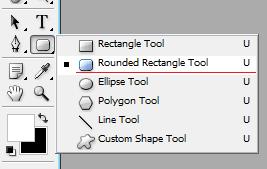
  3. Work out how much space your Twitter feed will take up, and insert a rectangle to the left that's about 194 pixels wide.  Using my rudimentary Photoshop knowledge I inserted a black rounded rectangle and then rubbed that out with a 50% opacity eraser, leaving a semi-transparent shape. 
  4. On top of that, paste in a picture of yourself, and any links you'd like to include.
  5. If you're lucky, you're good to go. When you upload the image to Twitter, make sure you centre align it.

If all that sounds like too much of a faff, don't worry, I have some useful links:


Notes:

  • I'm not convinced many people actually use twitter.com to tweet anymore, but it can't hurt to have a personalised background anyway
  • I have yet to test this background on various screen-sizes / resolutions, if it proves to be unsuitable, I'll edit the files in the download to a format that works better

Additional Notes

The dimensions above don't quite work at the moment, will update when I have better dimensions fixed :)

Friday, 25 January 2013

Six-second videos? That's Vine with me.

It's here, the all singing, all dancing embeddable (but not edible) Vine, an application that publishes six-second videos that embed in tweets. It generated plenty of excitement when it was revealed (who doesn't get excited about steak tartare?), but  a lot of people were also left pondering the value of six-second videos.

He's right, a lot of people posting Vines were trying to get a feeling for the application, and trying to work out exactly what the heck to do with it. It isn't surprising that many of the early experiments were less than compelling.

Despite this, I have seen some strong early examples of how Vine can work for non-profits and cause-focused organisations. Check out this one from Diabetes UK:

A beautiful example of fundraiser engagement with a really warm, personal touch. The six-second video really suits this sort of engagement.

The Dogs Trust were also very quick off the mark with their first attempt:
A compelling combination of a good cause, cute animals and a channel that makes sharing the call-to-action exceptionally easy. I love it.

We will need to wait and see if this really takes off, but if the early examples from Diabetes UK and The Dogs Trust are anything to go by, Vine provides a fantastic opportunity to produce creative and compelling content. We shouldn't underestimate the value that increased personalisation of engagement can offer, nor should we underestimate just how much the internet loves cute animals.

As well as the examples above, Vine provides clear opportunities for telling concise and compelling stories, and inviting your online community to share their stories with you in even more engaging ways; "Tell us why you care about X in six seconds" etc.

Have you created any Vines yet, or seen some really strong examples? If you have, please link to them in the comments or tweet me

Now, all they need to do is release an Android app.

Signed
Slightly disappointed Android user

Update: Well worth checking out a collection of non-profit Vines that Kirsty Marrins is Storifying here

Friday, 17 August 2012

“PR should own social media” Yes! It should, but...


This piece references a beautifully frank interview with Martin Harrison by Craig McGill at The Drum – I fully recommend reading it, and then coming back to read this piece, if you’re so inclined.

The question you might ask is; “If social media doesn’t sit in PR, where the heck does it sit?”

Well, I’ve spent a little over three years, spanning two jobs and some freelance bits-and-bobs, working in social media roles. In both full-time jobs, my role began in the Web Team, and was then moved to the Press Team. In both cases, I worked very closely with the Press Team whilst I was seconded to the Web Team, and then worked very closely with the Web Team when my role moved to the Press Team. My freelance work is usually commissioned by the Press or Marketing Teams of the organisations that I work with.

It’s interesting, the core function of a social media guy or gal is to communicate, usually to speak on behalf of the organisation through branded accounts (I know the role is far more complicated than that, but talking to people online on behalf of your organisation is the basest, most simplified way of describing what people like me do to put bread on the table). That voice, or at least the person/s responsible for the formation and development of that voice, should sit within the Press Team, absolutely no question about that.

Having said that, the best social media people also have a working understanding of SEO, HTML and image editing software (Photoshop etc), and the really good ones might be able to turn their hand to some programming as well. It is this understanding of the technical side of online that can really help to drive creativity and deliver campaigns that really have an impact.   

Your social media manager/strategist/other should sit with the Press Office peeps, but he or she MUST have direct communication channels with your Web Team, Customer Support Team, and any other people that speak on behalf of the organisation in any role – From your Chief Exec to an intern helping to draft some copy for the website.

The key is to ensure that your social media person is adept at razing silos to the ground, developing/fixing/maturing internal comms channels, and being able to do all this whilst developing positive relationships with key members of key teams within your organisation, rather than harming them.

Does your organisation’s social media role sit somewhere other than the Press Team? If so, where does it sit, and why?

Sunday, 20 May 2012

Interesting Twitter update - Changes to ToS and Privacy Policy


Just received an interesting update from Twitter - changes to ToS and the privacy policy. It sounds like they're being more open (and I do have a lot of respect for the lengths Twitter will go to to protect their users), but what do you think? 

Message follows:

Hi Paul Darigan,


New things are always happening here at Twitter HQ. We're growing at a rapid pace, and our commitment to simplicity, transparency, and reaching every person on the planet continues. We thought you might be interested in knowing about some of our most recent developments:
  • new weekly email that delivers the most interesting news and items you might have missed from the people you're connected to on Twitter.
  • Now Twitter is in more languages than ever. Check for your preferred language and change your setting.
  • Download the latest Twitter mobile apps at twitter.com/download.
  • There's more to Discover on Twitter.com - try out the new Discover tab.
In addition, we've made a number of updates to our Privacy Policy and Terms of Service.
Here are some of the main changes to our Privacy Policy, with links for more information:
  • We've provided more details about the information we collect and how we use it to deliver our services and to improve Twitter. One example: our new tailored suggestions feature, which is based on your recent visits to websites that integrate Twitter buttons or widgets, is an experiment that we're beginning to roll out to some users in a number of countries. Learn more here.
  • We've noted the many ways you can set your preferences to limit, modify or remove the information we collect. For example, we now support the Do Not Track (DNT) browser setting, which stops the collection of information used for tailored suggestions.
  • We've clarified the limited circumstances in which your information may be shared with others (for example, when you've given us permission to do so, or when the data itself is not private or personal). Importantly, our privacy policy is not intended to limit your rights to object to a third party's request for your information.
In our Terms of Service, we've clarified how your relationship with Twitter works and made a number of small changes and formatting improvements, such as new headings for easy reference and updated descriptions of our services.
Take a moment to read our new Privacy Policy and Terms of Service, and thanks for using Twitter.
The Twitter Team

Wednesday, 9 May 2012

Twitter Visualisation Tools - In Action

Holding an event? Inviting people to tweet to a hashtag? Want to display those tweets? Great!

I've pulled together a list of different Twitter visualisation tools beneath - Some of them look pretty cool, others are a little bit dull but functional. Anyway, check them out, let me know what you think.

Note: In all examples, I've chosen to display tweets for the #ff hashtag - I don't endorse any tweets that appear, blah blah blah, etc.

1. Visible Tweets

I came across Visible Tweets a few weeks ago and I really like it. You can choose from three different types of animation and all of them are attractive. The one downside is that it is necessarily a little bit slow cycling through tweets, so don't expect it to pick up and display every tweet if you're hosting a popular event.


2. Twitter Search Widget

The Twitter Search Widget might not be quite as attractive as Visual Tweets, but it does allow you a great degree of personalisation. You can edit its dimensions, colour, frequency of updates, and much more.


3. Twitter Fountain

Twitter Fountain is a handy tool, it pulls in hashtagged tweets and mashes them up with images from Flickr. There are lots of different display options that you can fiddle with.
 

There are more Twitter visualisation tools that I either can't embed on the blog or haven't paid for, but that I believe are still worth a look:

  • Twitterfall - Basic but functional, although it does scroll a little too quickly for my liking (Free)
  • TweetWall Pro - Looks very impressive, lots of different themes (Free trial, paid for thereafter)
  • Revisit - Well worth a look, really interesting layout and it 'emphasizes conversational threads' (Free)

That's it from me for the moment. Let me know if you've got any more event-oriented visualisation tools to add to the list above.

Saturday, 28 April 2012

"These views are my own..."

The caveat that graces several million Twitter bios (including my own), and that is required by just about every social media policy going.

Now that I’ve added that disclaimer to my bio, I’m free to turn the twittersphere blue, endorse politically-incorrect causes and indulge in tweeting some offensive ‘jokes’... right?

Wrong.

Everything you post says something about you and adds to your overall digital footprint, which can say a lot about you. Check it out - Google yourself and see what you find, I’ll wait...

... Done? Did you like what you saw? Would a current or potential employer like it? Would clients or customers of that employer like it? You had better hope so, because it reflects on them as well.

If I see an employee of a charity posting offensive comments online, am I more or less likely to donate money or volunteer with that charity?

If my broadband contract is up for renewal and I see that a customer support officer at ‘Broadband Provider X’ tends to tweet highly offensive jokes, am I going to want to deal with that person when my connection drops?

Those examples may be trite, but if your employer has seen fit to employ you, that is both an endorsement of your skill-set and of your personality.

But I don’t reference my job in my bio

That doesn’t really matter I’m afraid. In the vast majority of cases it just takes a quick search and a few clicks to find the person behind the twitter account and to figure out where they work.

That all sounds a bit depressing

It doesn’t have to be. Protecting your employer by being careful with your posts also protects you. It helps you to avoid tweeting a stream of expletives when your football team concedes a goal and it helps to stop you getting involved in pointless spats online.

I dislike the term ‘personal brand’, but it does have a place here. Do your online posts reflect the personal brand that you would like to present and market?


*Disclaimer* The tone of tweets mentioned in the second paragraph are not indicative of the sort of content I would like to be able to tweet. The sort of tweets that I want to (and do) post are sometimes a little bit grouchy, but mostly pretty safe (some might even use the term ‘dull’)

Sunday, 15 April 2012

Measuring a Twitter Campaign on a Budget

Great, you’ve designed a Twitter campaign that you’re sure is going to go viral, now all you need to do is work out how you’re going to measure it.

The first thing you need to do is work out what your ‘done’ is. Is your campaign about your hashtag reaching as wide an audience as possible, is it about attracting more Twitter followers, collecting stories, or is it about driving people to a conversion page?

Hashtag Stats
Measuring stats on a hashtag is rarely a terribly useful metric, but it does have merits when used in conjunction with other key performance indicators. I use Hashtracking to measure the hashtag stats side of any campaign. The free service will measure up to 1,500 tweets over a 24-hour period. If you think your campaign will top-out at over 1,500 tweets or go on for more than 24-hours, I recommend using their paid-for service (currently $40USD).

Hashtracking will measure the number of tweets containing your hashtag, the reach of those tweets, and the impressions they generate.

This may go without saying, but if you want reliable stats on your hashtag ensure that your hashtag is unique to your campaign.

Twitter Followers
Well this is easy, you can take note of your followers before the campaign starts, and again when it’s finished. If that sounds a bit too much like hard work, you can always turn to Twitter Counter (they’ll even give you a graph).

Collecting Stories
Asking people to tweet their stories to a hashtag can be a great way of sourcing case-studies and identifying online ambassadors. Storify is a great free way to publicly curate these stories.

Conversions
This comes down to your on-site analytics package. Google Analytics is a great free tool and the good people at Google have some really useful resources to help you get started.

One final note before you kick-off your campaign – Read the Twitter “Guidelines for Contests onTwitter